Microsoft's Surface Neo, the larger laptop-sized device, and Surface Duo (pictured above), a more svelte phone, are bets on the future of dual-screen devices. They hearken back to the original Surface, which paved the way for the plethora of 2-in-1 and convertible PCs we see today. Devindra Hardawar even got some hands-on impressions of both -- unfortunately they weren't turned on for him to use.
The Surface Duo will run Android across two 5.6-inch screens that provide a total 8.3 inches of space for multitasking or comfortable thumb typing. It can fold 360 degrees to help you take a phone call, too. Currently scheduled to ship for the 2020 holiday season.
The Surface Neo tablet packs two 9-inch screens that combine into a 13-inch area that helps with multitasking. And if you need to type a long message, there's a compact wirelessly charging keyboard that effectively turns the Neo into a laptop. This is the first known device to use Intel's Lakefield processor, too, and it'll be the flagship hardware for Windows 10X. It's also scheduled to ship late next year.
Windows 10X is considerably more efficient than standard Windows and sports an interface optimized for dual screens, including more elegant app placement and a more touch-friendly Start menu. It'll arrive alongside the Surface Neo and other dual-screen PCs in fall 2020.
Leaks exposed a lot of the Surface lineup early, but since these are the devices that will be available this year, we'll run down the details quickly.
The 13-inch Surface Pro X runs on a custom Snapdragon-influenced SQ1 processor that allows for an extremely slim and light (0.2in and 1.68lbs) body even though it packs LTE connectivity. According to Cherlynn Low, its PixelSense display looked bright and inviting, and it felt lighter than the Galaxy Tab S6 and iPad Pro. It goes on sale November 6th -- with a new Slim Pen stylus -- at a starting price of $999.
Amid all the laptops and multi-screened devices, Microsoft's Surface Earbuds broke cover. They're touch- and voice-enabled with omnisonic sound and boast a pair of mics in each bud. They come with a charging case and have a battery life of up to 24 hours. The Earbuds are designed with Office 365 in mind and include Outlook calendar and email access with your voice.
And crucially, these are newcomers adding to Tesla's ranks. Much like in Q2, "nearly all" of the 79,600 Model 3s delivered in the period went to customers who didn't hold a reservation. That's a sign of "strong organic demand," if you ask Tesla. For the company, the challenge will be turning this momentum into profit. Shrinking US subsidies have made it more expensive to buy a Tesla, and competition is looming.
For a long time, Sony was resistant to letting people play PS4 games with their friends on other consoles and platforms. It eventually cracked open the door with a cross-play beta for Fortnite a little over a year ago, and now it's allowing all developers to make use of cross-platform capabilities. Sony didn't announce the news with huge fanfare. It was almost as an aside in a Wired story about its cloud-gaming ambitions. Let's see how many developers bite.
All products recommended by Engadget are selected by our editorial team, independent of our parent company. Some of our stories include affiliate links. If you buy something through one of these links, we may earn an affiliate commission.
Google Lens is a popular and nifty app with several powerful functions: search with your camera, translate text you see, identify objects, and more. Starting today, it's being upgraded with a new feature called "style ideas" that's meant to give you "outfit inspiration from around the web."
Here is how "style ideas" is supposed to work inside Google Lens: when you see an article of clothing you like, inside a store or on a website, take a picture of it. Google Lens will first display search results for what it thinks is the item and lay out merchant websites that sell it. When you scroll down further, Lens will show pictures of people wearing the said item in different outfit configurations and styles. After looking over these "style ideas," you are then meant to decide whether that clothes would be a good fit for your personal style and preference.
If you normally have a hard time imagining how a certain outfit will look on you, go open Google Lens (either from the below-linked app, or from the Camera app on some devices), start taking some pictures, and give "style ideas" a whirl.
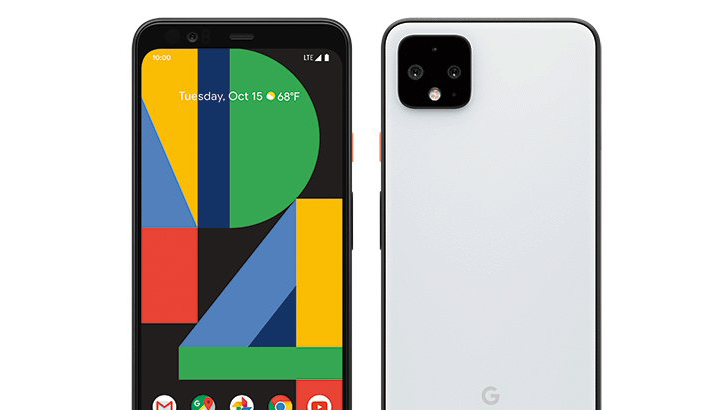
We are 13 days away from the Made by Google event on October 15th and leaks about the Pixel 4 and Pixel 4 XL continue gushing out. We've already seen the official press renders and covered new functions which are possibly exclusive only to the Pixel 4 devices. One of the latest leaks to come out spills the beans on what's inside the Pixel 4 devices and what will be included in the box.
The report by 9to5 Google confirms mostly what we already suspected — both Pixel devices will be powered by the Snapdragon 855 SOC, come equipped with 6GB of RAM, have 64GB or 128GB of internal storage, feature OLED displays, carry two cameras on the back, and include the Titan M Security Module. Here is the leaked photo of the official spec sheet:
The only significant piece of information that wasn't spotlighted by the previous leaks is the mention of the "Pixel Neural Core" — it's likely a new camera-related marketing term that supersedes the previous "Pixel Visual Core" terminology. We'll know for certain come the 15th.
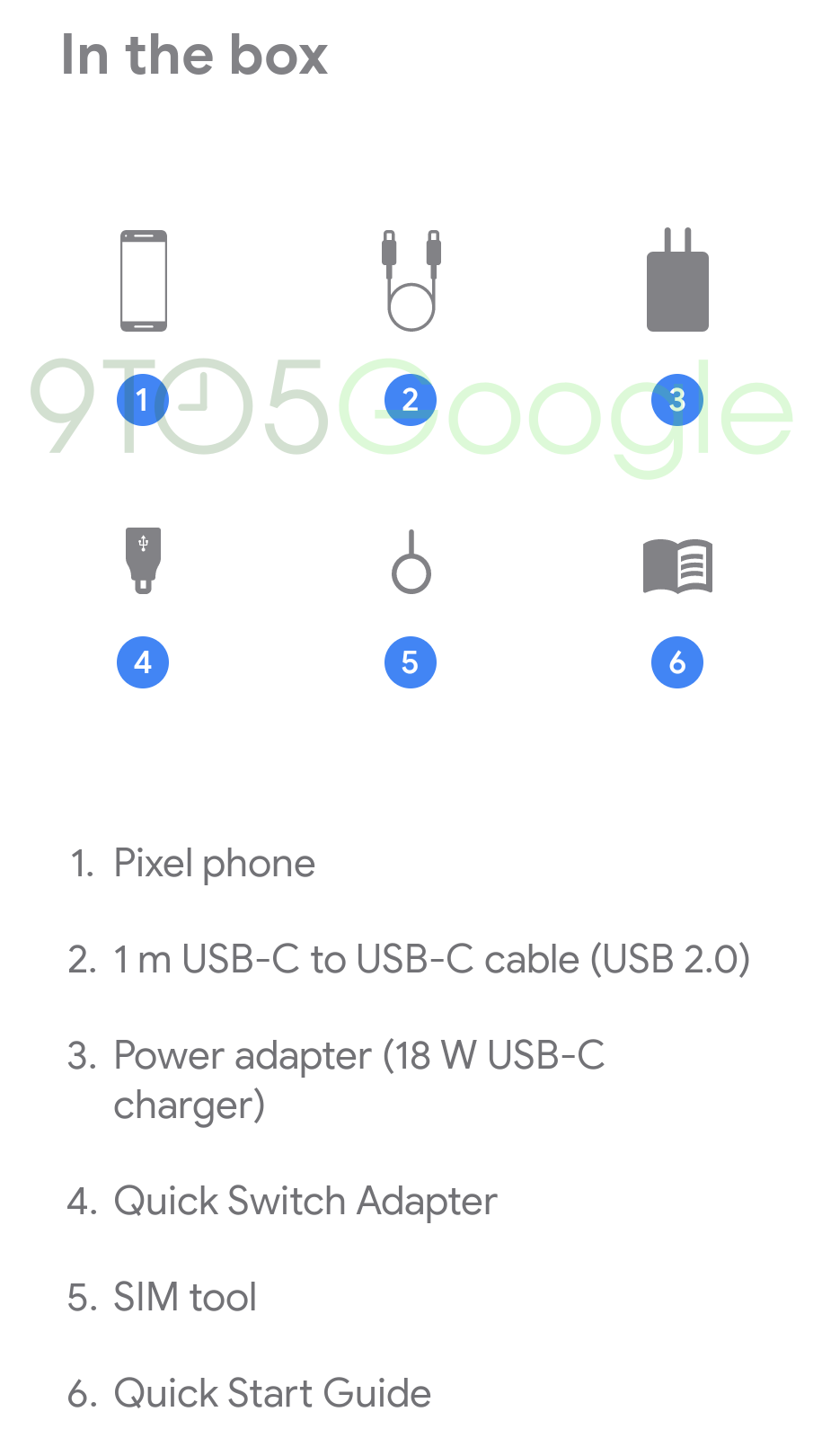
Also leaked was a list of items that'll be included in the box for the US Pixel 4: a 1-meter USB-C to USB-C cable, an 18W USB-C charger, a Quick Switch Adapter, a SIM tool, and a Quick Start Guide.
With such an influx of leaks coming out on an almost daily basis, we wonder if there will be any surprises left before the phones are officially unveiled on the 15th.
This photo was taken using Apple's new Deep Fusion process, which optimizes detail and minimizes image noise.
Apple
Deep Fusion, Apple's new image processing technique for the iPhone 11, 11 Pro and 11 Pro Max, is now available as part of both the developers beta and public beta of iOS 13.2. Deep Fusion will only work with iOS devices running an A13 Bionic processor, which is currently only the newest iPhones.
When the iPhone 11 and 11 Pro were first announced in September, Apple showed off the new ultrawide-angle camera, Night Mode and an improved selfie camera, all of which represented a significant step forward for iPhone photography and videos. And now that they're in the wild, we've tested the new iPhone cameras and can confirm their improvements as well as the absolute enjoyment we feel using that ultrawide-angle camera. But there's one camera feature that Apple teased at its fall iPhone event that no one has gotten to try: Deep Fusion.
While it sounds like the name of an acid jazz band, Apple claims the brand-new photo processing technique will make your pictures pop with detail while keeping the amount of image noise relatively low. The best way to think of Deep Fusion is that you're not meant to. Apple wants you to rely on this new technology but not think too much about it. There's no button to turn it on or off, or really any indication that you're even using the mode.
Now playing:Watch this:
We compare the cameras on the iPhone 11 Pro and iPhone...
8:23
Right now, anytime you take a photo on an iPhone 11, 11 Pro or 11 Pro Max, the default mode is Smart HDR, which takes a series of images before and after your shot and blends them together to improve the dynamic range and detail. If the environment is too dark, the camera switches automatically into Night Mode to improve brightness and reduce image noise. With Deep Fusion, anytime you take a photo in medium to low light conditions, like indoors, the camera will switch automatically into the mode to lower image noise and optimize detail. Deep Fusion, unlike Smart HDR, works at the pixel level. If you're using the "telephoto" lens on the iPhone 11 Pro or 11 Pro Max, the camera will drop into Deep Fusion pretty much anytime you're not in the brightest light.
This means the iPhone 11, 11 Pro and 11 Pro Max have optimized modes for bright light, low light and now medium light. And I'd argue that most people's photos are taken in medium- to low-light situations like indoors. The impact that Deep Fusion will have on your photos is enormous. It's like Apple changed the recipe of Coke.
At the iPhone event, Apple's Phil Schiller described Deep Fusion as "computational photography mad science." And when you hear how it works, you'll likely agree.
Essentially anytime you go to take a photo, the camera is capturing multiple images. Again, Smart HDR does something similar. The iPhone takes a reference photo that's meant to stop motion blur as much as possible. Next, it combines three standard exposures and one long exposure into a single "synthetic long" photo. Deep Fusion then breaks down the reference image and synthetic long photo into multiple regions identifying skies, walls, textures and fine details (like hair). Next, the software does a pixel-by-pixel analysis of the two photos -- that's 24 million pixels in total. The results of that analysis are used to determine which pixels to use and optimize in building a final image.
Here's another iPhone phone taken with Deep Fusion. Details like hair, beard hair, the sweater, the fabric of the couch and the texture of the wall are all optimized by the Deep Fusion process.
Apple
Apple says that the entire process takes a second or so to happen. But to allow to you to continue snapping shots, all of the information is captured and processed when your iPhone's A13 processor has a chance. The idea is that you won't be waiting on Deep Fusion before taking the next photo.
The release of Deep Fusion comes just a couple weeks before Google will formally announce the Pixel 4, its latest flagship phone in a line renowned for camera prowess.
I should note that Deep Fusion will only be available on the iPhone 11, 11 Pro and 11 Pro Max because it needs the A13 Bionic processor to work. I'm excited to try it out and share the results once the developer's version is out.
Now playing:Watch this:
iPhone 11: 3 phones, reviewed. Which do you choose?
Enlarge/ Mmmmm, business-y. Don't expect to build your own Ryzen Pro 3000 system—the new chips are, sadly, only available to large OEMs.
AMD
Monday, AMD announced Ryzen Pro 3000 desktop CPUs would be available in Q4 2019. This of course raises the question, "What's a Ryzen Pro?"
The business answer: Ryzen Pro 3000 is a line of CPUs specifically intended to power business-class desktop machines. The Pro line ranges from the humble dual-core Athlon Pro 300GE all the way through to Ryzen 9 Pro 3900, a 12-core/24-thread monster. The new parts will not be available for end-user retail purchase and are only available to OEMs seeking to build systems around them.
Model
Cores/Threads
TDP
Boost/Base Freq.
Graphics Compute Units
Ryzen 9 Pro 3900
12/24
65W
4.3GHz / up to 3.1GHz
n/a
Ryzen 7 Pro 3700
8/16
65W
4.4GHz / up to 3.6GHz
n/a
Ryzen 5 Pro 3600
6/12
65W
4.2GHz / up to 3.6GHz
n/a
Ryzen 5 Pro 3400G
4/8
65W
4.2GHz / up to 3.7GHz
11 CUs
Ryzen 5 Pro 3400GE
4/8
35W
4.0GHz / up to 3.3GHz
11 CUs
Ryzen 3 Pro 3200G
4/8
65W
4.0GHz / up to 3.6GHz
8 CUs
Ryzen 3 Pro 3200GE
4/8
35W
3.8GHz / up to 3.3GHz
8 CUs
Athlon Pro 300GE
2/4
35W
3.4GHz / up to 3.4GHz
3 CUs
From a more technical perspective, the answer is that the Ryzen Pro line includes AMD Memory Guard, a transparent system memory encryption feature which appears to be equivalent to the AMD SME (Secure Memory Encryption) in Epyc server CPUs. Although AMD's own press materials don't directly relate the two technologies, their description of Memory Guard—"a transparent memory encryption (OS and application independent DRAM encryption) providing a cryptographic AES encryption of system memory"—matches Epyc's SME exactly.
AMD Memory Guard is not, unfortunately, available in standard Ryzen 3000 desktop CPUs. If you want to build your own Ryzen PC with full memory encryption from scratch, you're out of luck for now.
AMD Memory Guard appears to be the only technical feature in "GuardMI" that wasn't already present in non-Pro Ryzen 3000 CPUs.
AMD isn't as explicit as it could be about "GuardMI"—but AMD Memory Guard appears to be the only feature not already present in regular Ryzen 3000 CPUs.
AMD
AMD supports Microsoft's platform-independent encryption, authentication, and security features.
AMD
AMD wants to make sure OEMs are paying attention to their feature parity—and superiority—with Intel vPro CPUs.
AMD
HP's EliteDesk 705 G5 Small Form Factor and EliteDesk G5 Mini will be among the first PCs to feature the new Ryzen Pro 3000 CPUs. The SFF desktop PC will be available with the Athlon Pro 300GE APU, the Ryzen 3 Pro 3200G, or Ryzen 5 Pro 3400G. The Mini offers the same selection, along with the Ryzen 3 3200GE and Ryzen 5 3400GE low-power variants.
Google is rolling out its handy Password Checkup tool to a wider audience because let’s be honest: How good is your password protocol? If you share your login credentials, re-use passwords across accounts (whether or not you perceive those accounts as low-risk), or use easy-to-guess passwords for any of your accounts, the answer is: probably not as strong as you think.
Common password sins, the same ones that can allow even unsophisticated bad actors to access your accounts, are the reasons Google is this week introducing a wide rollout of a popular Chrome extension it launched back in February: Password Checkup. Staying on top of your account security can be a chore—who has the time to regularly check Have I Been Pwned for potential vulnerabilities?—and Google is hoping that taking the guesswork out of strong password protection will help improve the security of its users.
Advertisement
Password Checkup works like this: When you sign into account—say, your bank or Netflix—the extension cross-checks those credentials with more than 4 billion usernames and passwords that have been exposed in a data breach (which are, unfortunately, exceedingly common), according to Google. If it finds that those login credentials have been exposed, or if they are particularly weak or have been re-used in your other accounts, it’ll flag a notice to change your password. Beginning Wednesday, and as part of National Cybersecurity Awareness Month, Password Checkup is launching in the Password Manager section of users’ Google Accounts to let them run a scan on their credentials with one click—no need to download the extension at all. Later this year, it’ll get baked right into Chrome, allowing potentially problematic credentials to be flagged on the fly.
Ahead of its wider rollout, Google partnered with Harris Poll to dig into the common password security habits of 3,419 U.S. adults that put those users at risk. What Google found were some “depressing” and “distressing” facts about password protocols among Americans, Mark Risher, director of account security at Google, said last week during a press event at the company’s New York City headquarters. For example, nearly one in four Americans have used passwords frequentlyflagged as common and weak (e.g. “111111,” “123456,” “Iloveyou,” or any other easy-to-remember variation).
Sixty-six percent of respondents reported using the same password for more than one account, the Harris survey found, a habit that can potentially compromise multiple accounts simultaneously in the event that one is exposed in a breach. Only 37 percent of users used multi-factor authentication, the poll found, and a mere 15 percent used a password manager—two security measures that are imperative to good password hygiene.
Advertisement
Risher said Americans tend to categorize their credentials into three primary tiers: highly sensitive (e.g. bank accounts), medium (like email), and non-important (Netflix, Seamless, etc.). But Risher added we kind of suck at this categorization—our words, not his—and end up reusing passwords when we shouldn’t. In a perfect world, every account would have a long, complex password that a user can neither remember nor even needs to know because a password manager does it for them, and that password would only need to be changed in the event of a security breach, as per recommendations by the National Institute of Standards and Technology. But because good security is often overlooked in favor of convenience, as the Harris survey suggests and we all know deep in our hearts to be true, Google is attempting to intervene.
Ultimately, Google said it’s trying to curb bad habits as well as misinformation around password protocols, such as the misconception that physically writing down a password is bad practice. (In fact, as we saw recently, writing passwords down and storing them safely can be quite effective in protecting against bad actors.) Sharing credentials for accounts perceived as low-risk, like Netflix or Hulu, is also a fuck-up, particularly in the event that the password for such an account is similar to or the same as that of another account. (According to the Harris Poll findings, 27 percent of Americans have attempted to guess someone else’s password, and of that number, 17 percent have done so successfully.)
Advertisement
Asked by Gizmodo how Google pulls together its database of more than 4 billion unique password pairs, Risher said that most of that information is collected by crawling the open web and its own search engine. But like, say, your credit card company, Google also crawls the dark web to hunt for exposed usernames and passwords, according to Risher.
This tool is meant to surface recurring, problematic, or at-risk password behaviors for people who may not already be taking necessary measures to protect their account data. (Get yourself a dang password manager, already!) But it may still be useful for the security buff already taking the necessary steps to protect their information. If, for example, login credentials for an old or forgotten account were breached and you somehow missed it, Google’s Password Checkup may remind you to update the username and password for that account. To boot, it’ll also work in tandem with password managers you may already use.
Advertisement
To access Password Checkup, just head to your Google Account, navigate to the Security screen, and then to your Password Manager (at the bottom). Or, just head here.